Upgrading IAM from 1.5.x to 1.6.0
IAM 1.6.0 introduces entity-scoped permissions. The Helm chart has breaking changes that must be addressed before deployment, followed by two operator migration steps that must complete before the environment is handed over. A third cleanup step can be carried out at any time afterwards by anyone with group management permissions.
Helm chart breaking changes
- Keycloak values flattened: Nested Bitnami paths (
keycloak.keycloak.*) are no longer valid. Move settings to the flatkeycloak.*namespace (keycloak.auth.*,keycloak.extraInlineConfig,keycloak.image.*, etc.). See IAM Helm Chart Configuration and Keycloak Database Configuration. - Bitnami PostgreSQL removed: The bundled
keycloak.postgresql.enabledoption is gone. Use CNPG or an external database. - Keycloak workload changed: Keycloak runs as a Deployment (not a StatefulSet). Durable state remains in PostgreSQL.
- OpenShift: Set
keycloak.runAsUser,runAsGroup, andfsGrouptonullso the SCC can assign UIDs.
Prerequisites
- IAM 1.6.0 (and the accompanying Keycloak build) is fully deployed and healthy.
- You have an active session as a realm super_admin in IAM.
- A Keycloak database backup taken immediately before deployment — this is the only way to fully roll back if the permission migration produces unexpected results.
Obtain a bearer token for the migration calls:
IAM_URL=https://<your-iam-host>
TOKEN=<bearer-token-from-your-iam-session>
Warning
Use a token obtained from the realm you are migrating. A master-realm token will stamp completion markers on the wrong realm.
Step 1 — Migrate legacy permissions
This step removes legacy group-ID permission grants from the IAM module — a permission structure that no longer exists in 1.6.0. Specifically, it deletes permissions that carry a roles.group grant, together with their user and group assignments and mirrored copies. Permissions belonging to other modules are not touched. Run the preview first to review what will change before committing.
Both endpoints support two response modes: application/json returns a single JSON object with the final totals once the run is complete; text/event-stream streams a chunk event per batch (same format as Step 2). The JSON mode is simpler for scripting; use SSE for live progress on large environments.
Preview (read-only, no data changed)
curl -s -X POST "${IAM_URL}/api/Permission/admin/migrate-preview?force=false" \
  -H "Authorization: Bearer ${TOKEN}" \
  -H "Accept: application/json"
The response is a single JSON object with the final totals:
| Field | Meaning |
|---|---|
totalProcessed |
Total permissions evaluated |
totalGroupGrantsRemoved |
IAM-Module permissions that will be deleted because they carry a legacy roles.group grant (preview: projected; apply: actual). Permissions from other modules are never included in this count. |
totalUnassigned |
Group assignments that will be dropped due to scope mismatch. Expected to be zero when upgrading from 1.5.x — scoped groups did not exist in that release. |
totalManualReview |
Permissions requiring manual attention — neither preview nor apply auto-deletes these |
manualReviewSampleIds |
Sample IDs from totalManualReview to help identify what needs attention |
sweep |
Which pass this chunk belongs to. Apply re-sweeps the realm whenever a pass deleted rows, because deletions shift paging offsets. Counters are cumulative across all sweeps. |
done |
true when the run completed |
Verify done: true and review the counters. If totalGroupGrantsRemoved is unexpectedly high, or totalManualReview is non-zero, investigate before applying.
Apply
curl -s -X POST "${IAM_URL}/api/Permission/admin/migrate?force=false" \
  -H "Authorization: Bearer ${TOKEN}" \
  -H "Accept: application/json"
Same response format as preview. Wait for done: true. Apply may complete multiple sweeps — the counters accumulate across all of them.
Verify completion
Call migrate again without force to confirm it is now a no-op:
curl -s -X POST "${IAM_URL}/api/Permission/admin/migrate?force=false" \
  -H "Authorization: Bearer ${TOKEN}" \
  -H "Accept: application/json"
Expect totalGroupGrantsRemoved: 0, totalUnassigned: 0, and done: true immediately. The realm attributes permissions_migration_version = 2 and permissions_migration_completed_at confirm success.
Optional: streaming and batch size
To stream progress per batch instead of waiting for the final JSON, pass Accept: text/event-stream. Each event has type chunk and the same JSON payload described above:
curl -s -X POST "${IAM_URL}/api/Permission/admin/migrate?force=false" \
  -H "Authorization: Bearer ${TOKEN}" \
  -H "Accept: text/event-stream"
Add chunkSize=<n> to control how many permissions are processed per batch (default chosen by the server).
Re-running
Pass force=true to ignore the completion marker and re-evaluate. This is not an undo — it re-runs the same logic against whatever data is currently in the realm.
If interrupted mid-apply: Call migrate again without force. Apply commits in batches; a second call resumes where the first left off.
Step 2 — Backfill entity attributes
This step populates the cached entity_ids and entity_group_ids attributes on existing users and groups from their current permissions. Without it, users and groups will not appear in entity-scoped views even if they already hold the relevant permissions.
Both endpoints are SSE-only — they stream progress as Server-Sent Events and close the connection when done is true. Run users and groups independently; order does not matter.
Run
# Users
curl -s -X POST "${IAM_URL}/api/User/admin/backfill-entity-attributes?force=false" \
  -H "Authorization: Bearer ${TOKEN}"

# Groups
curl -s -X POST "${IAM_URL}/api/Group/admin/backfill-entity-attributes?force=false" \
  -H "Authorization: Bearer ${TOKEN}"
Response stream
Each SSE event has type chunk and a JSON payload with the following fields:
| Field | Meaning |
|---|---|
chunkProcessed |
Principals processed in this batch |
chunkChanged |
Principals whose cached entity attributes actually changed in this batch |
totalProcessed |
Running total of principals processed so far |
totalChanged |
Running total of principals changed so far |
done |
true on the final event — backfill is complete |
Wait for done: true on both users and groups before handing over the environment.
Optional: tuning batch size
Add chunkSize=<n> to control how many principals are processed per event (default chosen by the server):
curl -s -X POST "${IAM_URL}/api/User/admin/backfill-entity-attributes?force=false&chunkSize=100" \
  -H "Authorization: Bearer ${TOKEN}"
Re-running
Both endpoints are idempotent — they recompute from current permissions and never delete data. A completion marker is stamped on the realm after a successful run. Pass force=true to ignore it and re-run:
curl -s -X POST "${IAM_URL}/api/User/admin/backfill-entity-attributes?force=true" \
  -H "Authorization: Bearer ${TOKEN}"
If interrupted: Call the same URL again with force=false. The full set is always recomputed from scratch, so the result is consistent regardless of where the previous run stopped.
Step 3 — Repair legacy groups (UI)
Note
This step can be carried out at any time after the environment is live. Anyone with group management permissions can do it directly from the IAM UI.
Groups created before entity scoping was introduced have no scope label and appear as Unscoped (Legacy) in the User Groups list.
- Open User Groups in IAM.
- Apply the Needs repair filter — it shows only the groups that need action.
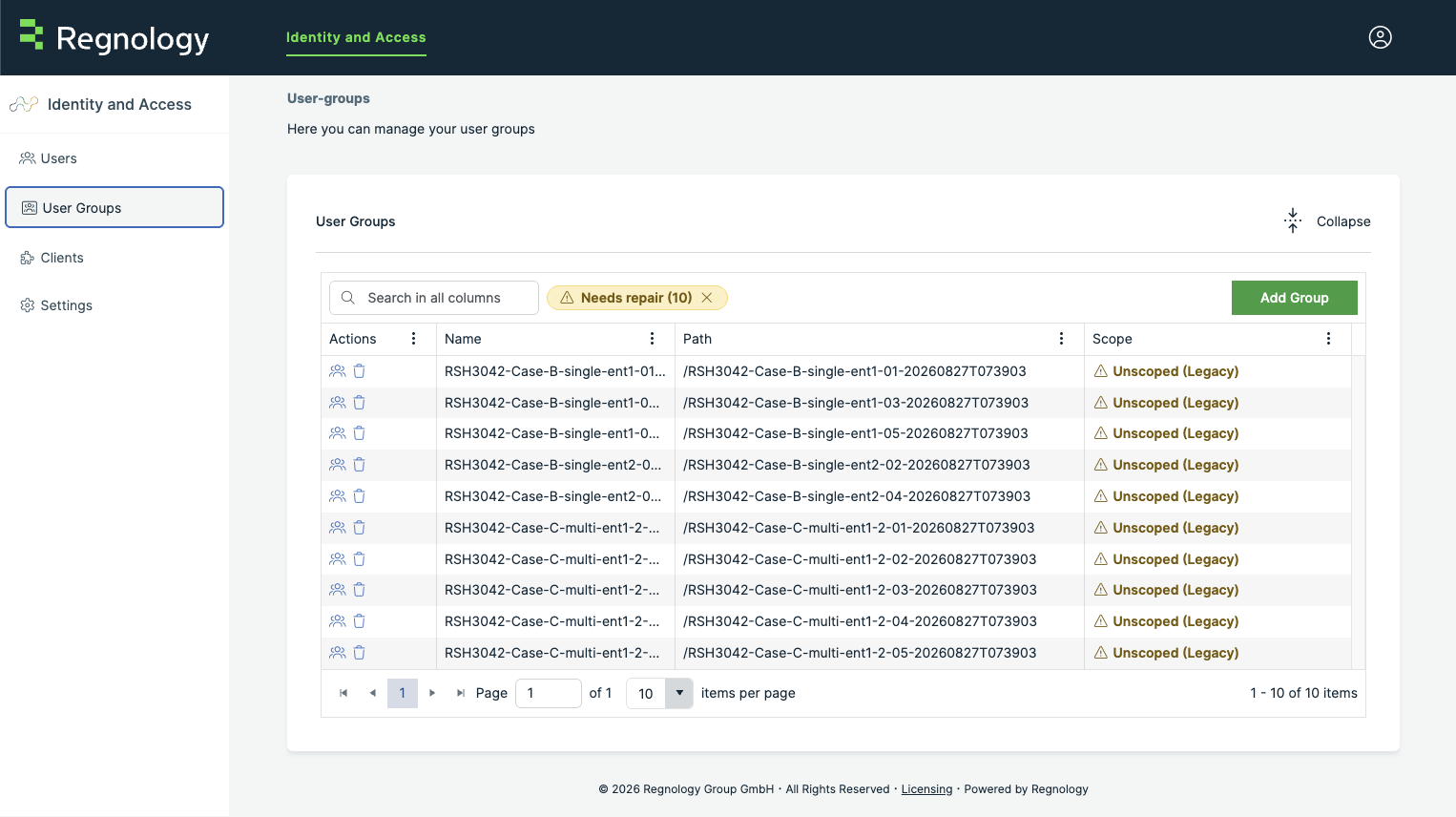
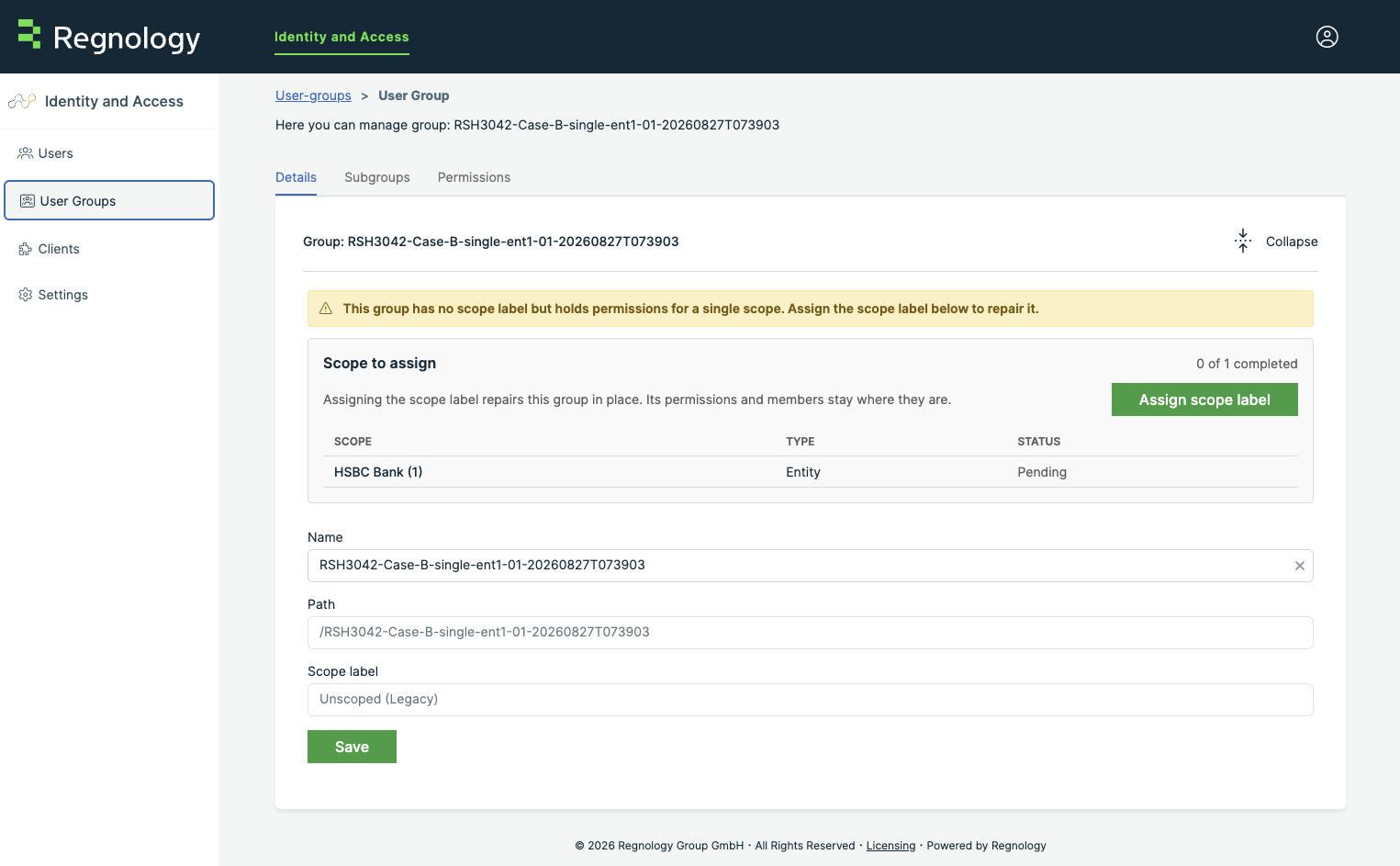
- Open each group's detail page. The repair panel at the top describes the case and offers the appropriate action.
Case A — single scope: the group holds permissions for exactly one entity and no unscoped permissions. Click Assign scope label to label the group in place. Permissions and members stay where they are.
Note
If the group also holds unscoped permissions (for example a permission without an entity context), the in-place label assignment is not available and the group is shown as Case B instead. Use the split flow to separate the entity-scoped and unscoped permissions into distinct groups.
Case B — multiple scopes: the group holds permissions across more than one entity. Select the scopes to repair (or click Select all pending), then click Split into scoped groups. Entity-scoped permissions and their matching members move to new scoped groups. Unscoped permissions stay on the original group.
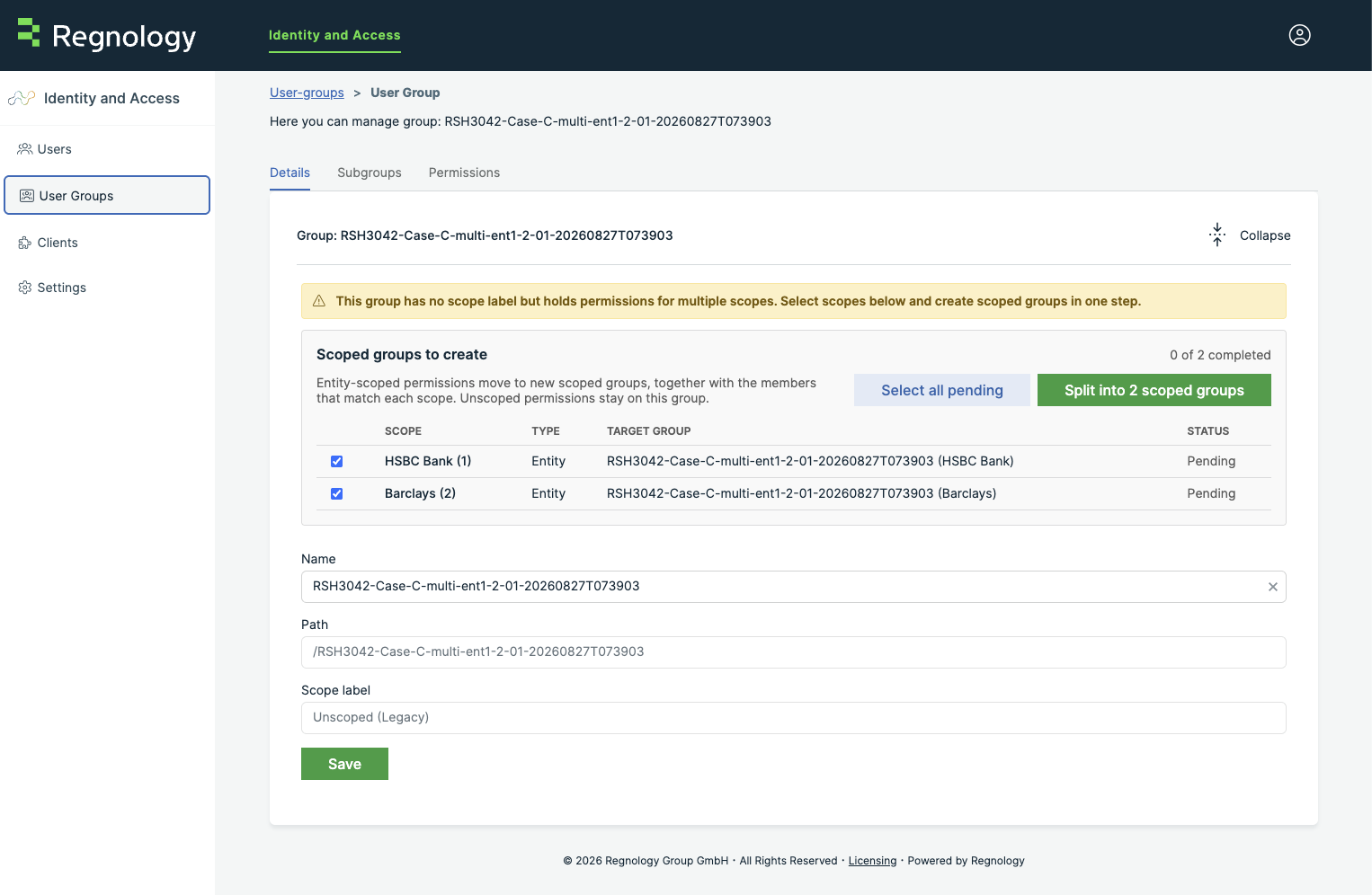
Repeat until the Needs repair filter returns an empty list.
Wizard limitations and edge cases
The repair wizard operates within the executing user's own permissions. Some scenarios therefore require manual follow-up or intervention from another administrator.
Scope outside your entity reach
If a scope row in Case B is greyed out with the message "This scope is outside your entity reach", you do not have Groups: Create access for the entity it covers. The wizard cannot repair that scope under your current permissions.
The wizard stops the entire batch when it reaches the first out-of-reach row. Any scopes listed after that row are not processed in the same run.
Ask an administrator with Manage Groups access for the affected entity to open the same group and repair the blocked scope(s).
Group members outside your user management reach
After a split completes, the repair panel may show a warning similar to:
Permissions were moved to "Group Name", but memberships for N user(s) could not be transferred because you do not have permission to manage those users. Ask an authorized administrator to transfer their memberships manually.
This means the permissions were moved successfully, but some members could not be added to the new scoped group. Their memberships on the original legacy group remain unchanged and are not lost.
An administrator with Manage Users access for those users must add them to the new group manually.
Permissions that cannot be mapped to a scope
If the repair panel shows "This group has permissions the repair cannot map to a scope. Resolve them before repairing", the group contains at least one permission whose context does not match any entity or entity-group scope known to the wizard.
These permissions must be investigated and removed or reassigned manually before the wizard can proceed.
Unscoped permissions locked until entity-scoped rows are repaired (Case B)
In a multi-scope group, the Unscoped permissions row at the bottom of the scope table is locked and shows "Repair the entity-scoped rows first" until all entity-scoped rows have been repaired.
This is intentional. The unscoped bucket can only be finalized after the entity-scoped permissions have been moved out.
Failure handling
| Situation | Action |
|---|---|
| Preview only, nothing applied | No data was changed. Safe to investigate and re-run. |
| Apply interrupted mid-run | Call migrate again without force. Apply commits in batches and resumes safely from where it stopped. |
| Apply completed with unexpected deletions | Restore the Keycloak database backup taken before deployment. Helm rollback alone is not sufficient — deleted permissions are not restored by chart downgrade. |
| Backfill interrupted | Call the same backfill URL again. The recompute is idempotent. |
| HTTP 403 | The caller does not have the super_admin role in this realm. |
| HTTP 401 | The session has expired or the bearer token is missing. |
Operator sign-off checklist
Before handing the environment over:
- [ ] Helm chart values updated for breaking changes
- [ ] Keycloak database backup taken before deployment
- [ ] Permission migration preview reviewed and accepted
- [ ] Permission migration apply completed with
done: true - [ ] Second migrate call is a no-op (zeros,
done: true) - [ ] User backfill completed with
done: true - [ ] Group backfill completed with
done: true