Module Integration with Platform API
This documentation is for developers of a module looking to integrate their module with the Platform API. It serves as an accompaniment to the general documentation here, which should be read first for context.
The Platform API is used to integrate a module with the platform and thus to other modules, e.g., Licensing, Datacollection, etc. It handles messaging (publishing of and subscribing to messages) as well as exchange (storage and retrieval) of files.
Integration
This section describes how to integrate a module with the Platform API.
Integration Overview
The technologies underpinning the platform are NATS for messaging and a configurable file-storage backend. Platform API Storage Configuration describes the supported providers and their Helm values.
However, the technologies underpinning the platform are abstracted from modules integrating with the platform via the Platform API. To integrate with the platform, each module will deploy its own configured instance of the Platform API image as depicted in the diagram below.
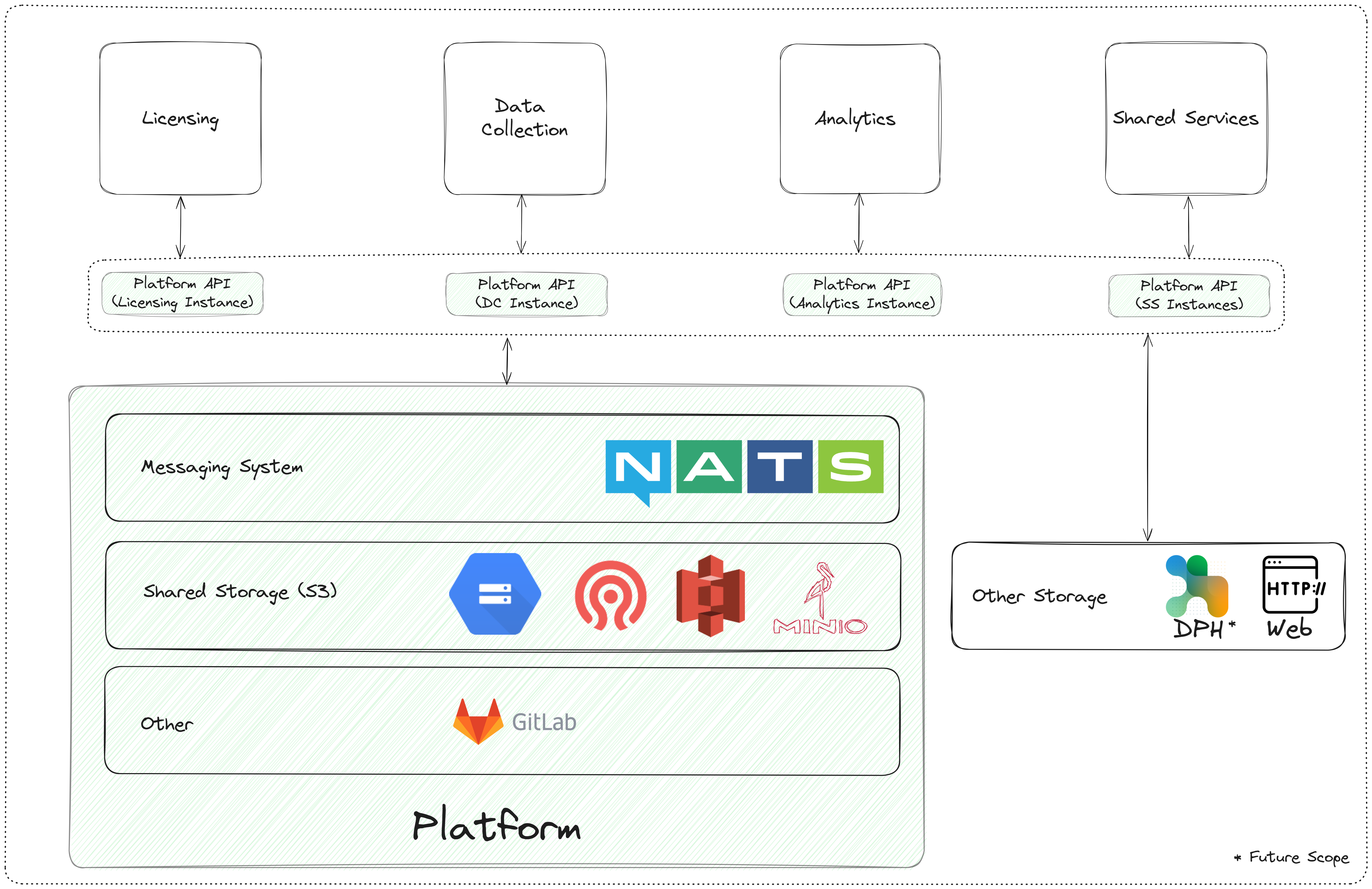
Note that where the Platform API is being used as a subscriber of messages (i.e. receives messages), only one instance of the Platform API is allowed per module. This is because only one durable consumer per module is permitted; consumption of the same message by multiple API instances for the same module would lead to duplicate processing. However, multiple instances can be configured for different message types, e.g., entity, entitygroup, and submission.
The following sections describe the Platform API in detail and, importantly: (i) the specifications for calling the API, and (ii) the API endpoints required from the module for any calls from the Platform API to it.
Platform API Endpoints
The Platform API has endpoints for health, storage and messaging. These are described below. Currently, no authentication is required to call the Platform API.
Health
A calling or monitoring application, e.g., Kubernetes health probe, can make a call to establish a connection to the API. No username or password is necessary. The endpoint for this is:
GET /health
Request
The health endpoint request does not take any parameters.
Sample Curl Request:
curl -X GET "{web address}/health"
Response
The response will be a 200 status code if healthy and a 503 (or other) status code if not.
| HTTP Status Code | Reason | Description | Remedial Action |
|---|---|---|---|
| 200 | OK | Application is healthy. | No action required. |
| 503 | ServiceUnavailable | The service is in an unhealthy state. | Review response body for an error message and if necessary review logs. |
Upload File
This endpoint is for the purpose of uploading a file to platform storage. Typically, the intent is to receive back a storage URI for the file so it can subsequently be included in a message for publishing, thereby sharing the file with other modules (i.e. those that subscribe to messages of that type/subject).
POST /v{version}/storage/upload
Request
As well as supplying the file itself, the file type must be specified in the upload. The file will be stored in platform storage in a folder according to its type.
| Parameter Name | Required | Data Type | Parameter Type | Description | Comment |
|---|---|---|---|---|---|
| version | Yes | string | path | The version number of the API endpoint. | 1 is the required value as that is the current version. |
| fileType | Yes | string | formData | The type of file being uploaded. | See general documentation here for file types for the relevant message type. |
| file | Yes | file | formData | The file to upload. |
Sample Curl Request:
curl -X POST "{web address}/v1/storage/upload" \
  --header "Content-Type: multipart/form-data" \
  --header "Accept: application/json" \
  --form "fileType=\"data\"" \
  --form "file=@\"my-file.xml\""
Response
The response will be a 200 status code if successful and a 400 (or other) status code if not. A 200 response will also contain a URI for the file in storage.
| HTTP Status Code | Reason | Description | Remedial Action |
|---|---|---|---|
| 200 | OK | File uploaded successfully. | No action required. |
| 400 | BadRequest | The file upload failed. | Review response body for an error message and if necessary review logs. |
Sample Response:
{
  "uri": "s3://rhp/data/my-file.xml"
}
| Parameter Name | Type | Description | Comment |
|---|---|---|---|
| uri | string | The URI of the file uploaded to storage. | See general documentation here for more information on URI formats. |
Download File
This endpoint is for the purpose of downloading a file from storage. Typically, the URI provided is one that is retrieved from a received message. The URI would usually refer to a location within platform storage, but other locations are possible. See general documentation here on storage for more information.
GET /v{version}/storage/download?fileType=<fileType>&fileUri=<fileUri>
Request
As well as supplying the file URI, for consistency the file type must be specified in the download.
| Parameter Name | Required | Data Type | Parameter Type | Description | Comment |
|---|---|---|---|---|---|
| version | Yes | string | path | The version number of the API endpoint. | 1 is the required value as that is the current version. |
| fileType | Yes | string | query | The type of file being downloaded. | See general documentation here for file types for the relevant message type. |
| fileUri | Yes | string | query | The URI of the file to download. | See general documentation here for more information on URIs. |
Sample Curl Request:
curl -X GET "{web address}/v1/storage/download?fileType=data&fileUri=s3://rhp/data/my-file.xml" \
  --header "Content-Type: multipart/form-data" \
  --header "Accept: application/json"
Response
The response will be a 200 status code if successful and a 400 (or other) status code if not. A 200 response will also contain the file in the body with a content type of application/octet-stream.
| HTTP Status Code | Reason | Description | Remedial Action |
|---|---|---|---|
| 200 | OK | File retrieved successfully. | No action required. |
| 400 | BadRequest | The file retrieval failed. | Review response body for an error message and if necessary review logs. |
Publish Message
This endpoint is for the purpose of publishing a message to the platform for other subscribed modules to receive.
POST /v{version}/messaging/publish
Request
A message consists of a subject and payload. The Platform API will validate message payloads against the message payload schema and reject the request if not valid. For more information on valid subjects and payloads, see the Messages section in the general documentation here.
| Parameter Name | Required | Data Type | Parameter Type | Description | Comment |
|---|---|---|---|---|---|
| version | Yes | string | path | The version number of the API endpoint. | "1" is the required value as that is the current version. |
| subject | Yes | string | formData | The message subject. | See general documentation here for standard message subjects. |
| payload | Yes | string | formData | The message payload. | See general documentation here for standard message payloads. |
Sample Curl Request:
curl -X POST "{web address}/v1/messaging/publish" \
    --header "Content-Type: multipart/form-data" \
    --header "Accept: application/json" \
    --form "subject=\"hub.entity\"" \
    --form "payload={ \"message\": { \"version\": 1, \"id\": \"40009a87-fc31-49ff-88fb-707a7475150b\", \"relatedId\": \"40bdad99-c18c-4246-bd41-60a04cea454f\", \"applicationId\": \"MasterDataModule\", \"dateTime\": \"2025-01-01T12:00:00Z\" }, \"entity\": { \"reference\": \"PB123\", \"names\": [ { \"locale\": \"en-GB\", \"name\": \"Peach Bank\" } ], \"status\": \"Active\", \"files\": [ { \"type\": \"entity-data\", \"uri\": \"s3://rhp/entity-data/pb123.corporateProfile.xml\" }, { \"type\": \"entity-schema\", \"uri\": \"s3://rhp/entity-schema/v4.corporateProfile.xsd\" } ] } }"
For entity group messages, use the hub.entitygroup subject and an entityGroup payload. For example:
curl -X POST "{web address}/v1/messaging/publish" \
    --header "Content-Type: multipart/form-data" \
    --header "Accept: application/json" \
    --form "subject=\"hub.entitygroup\"" \
    --form "payload={ \"message\": { \"version\": 1, \"id\": \"a1111111-b222-c333-d444-e55555555555\", \"applicationId\": \"Vizor\", \"dateTime\": \"2026-04-30T14:00:00Z\" }, \"entityGroup\": { \"id\": \"99\", \"names\": [ { \"locale\": \"en-GB\", \"name\": \"Entity Group A\" } ], \"membership\": { \"scope\": \"full\", \"members\": [] } } }"
Response
The response will be a 200 status code if successful and a 400 (or other) status code if not.
| HTTP Status Code | Reason | Description | Remedial Action |
|---|---|---|---|
| 200 | OK | Message published successfully. | No action required. |
| 400 | BadRequest | Message publishing failed. | Review response body for an error message and if necessary review logs. |
Module API Endpoints
Some platform integration use cases require the module to implement an endpoint for the Platform API to call. This section details those endpoints and their use cases.
Receive Message
Any modules that wish to subscribe to platform messages must implement this endpoint in order to receive them from their Platform API instance. This only applies to modules that configure their Platform API instance to subscribe to messages (see Configuration section in the general documentation here for how to configure subscriptions to different message subjects). All subscribed-to messages (i.e. all subscribed-to message subjects) are received by this endpoint.
POST /{endpoint URL}
Messages are delivered by the Platform API to this endpoint immediately and so are received in the order they were published. Messages will reattempt delivery until they are acknowledged by the receiving module(s).
In the event of the endpoint or Platform API instance not being available, the API will deliver any missed message(s) once they become available (assuming the message is still stored according to the message retention configuration; see platform documentation for retention rules). This is on a per-stream (per message subject) basis. Thus, as multiple streams will be delivered in parallel, any module integrating with the platform should make no assumptions that, across streams, messages are delivered in the order they were published. If necessary, the message.dateTime field (present in every message) can be used to discern the message generation date and time.
Note this pattern does not provide an acknowledgement back to the publishing module itself, but the publishing module can be assured of delivery via this behavior. If an acknowledgement is required by the publishing module from any subscriber module, then the relatedId pattern, to be implemented in future, should be utilized.
As described below, the above URL has no URL parameters; thus, it can be constructed as desired, e.g. https://my-module/messaging/receive. This should be the URL RHP_SUBSCRIPTIONS_URL configured in the Platform API instance. Please see the Configuration section in the general documentation here for more information.
Request
A message consists of a subject and payload. The Platform API will pass both to the module endpoint. For more information on valid subjects and payloads, see the Messages section in the general documentation here.
| Parameter Name | Required | Data Type | Parameter Type | Description | Comment |
|---|---|---|---|---|---|
| subject | Yes | string | form field | The message subject. | See general documentation here for standard message subjects. |
| payload | Yes | string | form field | The message payload. | See general documentation here for standard message payloads. |
Sample Curl Request:
curl -X POST "{endpoint URL}" \
    --header "Content-Type: application/x-www-form-urlencoded" \
    --header "Accept: application/json" \
    --form "subject=\"hub.entity\"" \
    --form "payload={ \"message\": { \"version\": 1, \"id\": \"40009a87-fc31-49ff-88fb-707a7475150b\", \"relatedId\": \"40bdad99-c18c-4246-bd41-60a04cea454f\", \"applicationId\": \"MasterDataModule\", \"dateTime\": \"2025-01-01T12:00:00Z\" }, \"entity\": { \"reference\": \"PB123\", \"names\": [ { \"locale\": \"en-GB\", \"name\": \"Peach Bank\" } ], \"status\": \"Active\", \"files\": [ { \"type\": \"entity-data\", \"uri\": \"s3://rhp/entity-data/pb123.corporateProfile.xml\" }, { \"type\": \"entity-schema\", \"uri\": \"s3://rhp/entity-schema/v4.corporateProfile.xsd\" } ] } }"
For subscribed entity group messages, the request uses the same form fields with subject set to hub.entitygroup and payload containing the entityGroup message payload.
Response
The response must be a 200-range status code if successful and a 400 (or other) status code if not.
| HTTP Status Code | Reason | Description | Remedial Action |
|---|---|---|---|
| Any 200 range | OK | Message received successfully. | No action required. |
| 400 | BadRequest | Message not received successfully. | Module team to investigate issue and if necessary review logs. |
Deployment
The Platform API can run in two different types of environments. It can run in a containerized environment (i.e. a cluster) via the Helm chart and image, or it can run in a server environment (i.e. in IIS on a server). The following details both options.
Cluster Deployment
Modules deploy their own Platform API instance by using the provided Platform API Helm chart as a subchart to their own Helm chart.
The chart with the name platform-api can be pulled from the Google development registry at europe-west3-docker.pkg.dev/supervision-hub-01/platform-charts.
To be able to pull the chart and the referenced image, pull credentials are needed. Reach out to the RSH platform team to retrieve these credentials.
To check the available versions of the chart, use the following command (requires authentication using the mentioned credentials and the skopeo and jq commands):
skopeo list-tags docker://europe-west3-docker.pkg.dev/supervision-hub-01/platform-charts/platform-api | jq '.Tags[]'
To pull the chart locally for investigation, use the following command (with the example version 1.9.0):
helm pull --untar oci://europe-west3-docker.pkg.dev/supervision-hub-01/platform-charts/platform-api --version 1.9.0
To integrate the Platform API Helm chart as a subchart to the module's Helm chart, the module's main Chart.yaml can be extended with the following snippet (with the example version 1.9.0):
dependencies:
- condition: platform-api.enabled
  name: platform-api
  repository: oci://europe-west3-docker.pkg.dev/supervision-hub-01/platform-charts
  version: 1.9.0
The condition can be chosen freely. In this example, the usage of the subchart is dependent on the platform-api.enabled flag.
To let the cluster nodes pull the Platform API image after deployment, the credentials to the registry need to be set. These are the same as for pulling the Platform API Helm chart.
Extend the values.yaml of the module's Helm deployment with the following settings:
platform-api:
  global:
    imageRegistry: europe-west3-docker.pkg.dev/supervision-hub-01/platform
    imageRegistryUsername: _json_key_base64
    imageRegistryPassword: <the-provided-password>
As the container image is only provided on the development registry, this image should be copied over to the module's release registry (e.g. Regnology Delivery Artifactory) on release.
Storage for the subchart is configured under platform-api.api.storage. See Platform API Storage Configuration.
Server Deployment
To deploy the Platform API to a server environment:
- The following prerequisite must be installed first:
- Retrieve the Platform API installation package from the release repository. This package is a zip package containing both the Platform API and a PowerShell installation script.
- Unzip the package.
- Update the configuration file located in the unzipped package:
.../src/app/publish/Config/appsettings.json. -
Run the script
install.ps1(also located in the unzipped package) as an administrator:To change the site name and binding information/ports, alter the
-SiteNameand-BindingInfoparameters below. It is recommended to change these so that they do not overlap with other modules' installed instances of the Platform API.cd <to-unzipped-package-folder> .\install\iis\install.ps1 -SiteName "PlatformApi" -BindingInfo "*:32800:" | Out-File -FilePath (".\install\iis\install_" + (Get-Date -Format "yyyy-MM-dd_HH-mm-ss") + ".log")
Testing
Manual Testing with Postman
For development and debugging:
- Use the Postman files distributed with the application to test the health, messaging, and storage use cases.
- Note that subscriptions are off by default. To enable these, please see the Configuration section in the general documentation here.
Automated integration testing
The platform ships an integration test suite (pytest-based, executed via
helm test) that validates Platform API functionality as part of the
overall platform integration testing. The tests cover:
Platform API test coverage
- Health endpoint testing – validates Platform API health and availability.
- Messaging integration – tests message publishing and subscription workflows through the Platform API.
- Storage operations – validates file upload/download capabilities via Platform API endpoints.
-
End-to-end workflows – complete workflows including:
- Entity message publishing with file attachments
- Licensing workflow integration via Platform API
- Message persistence and retrieval scenarios
Running the tests
To run the platform integration tests including Platform API validation, execute:
helm test <release-name> --filter name=integration-tests --logs -n <namespace>
Platform API specific test scenarios
The integration test suite validates these Platform API integration patterns:
Messaging Workflows:
- Publishing entity and entity group messages
- Subscribing to platform messages via configured endpoints
- Message payload validation against schemas
- Authentication token handling for secured endpoints
Storage Workflows:
- File upload to platform storage with proper URI generation
- File download from platform storage using generated URIs
- Storage bucket organization by file type
- External storage URI handling
Integration Workflows:
- Module-to-module communication via Platform API
- Error handling and retry mechanisms
- Authentication flow integration
- Configuration validation
Test configuration for Platform API
When configuring the integration tests, Platform API integration is tested through:
# Platform API is tested as part of the overall platform test suite
integrationTests:
  testSuites: "messaging licensing datacollection"
  messaging:
    natsUrl: "nats://{{ .Release.Name }}-nats:4222"
  dataCollection:
    hubUrl: "https://{{ .Release.Namespace }}.frontend.example.com"
  licensing:
    apiUrl: "https://{{ .Release.Namespace }}.licensing-internal.example.com/api/v1"
    # additional licensing configuration (username/password/entityId/returnTypeId/authToken) as needed
Recommendations
This section details some common practices/recommendations for any module to optionally follow when integrating with the Platform API.
JSON Transformation
Any team seeking to integrate with the Platform API might consider the flexibility to adapt to new messaging standards by way of JSON transformation configuration. As a suggested standard, an integrating module could use JOLT specifications to handle the transformation of the input and output JSON (i.e. the JSON from the module to the JSON for the message payload to be sent to the Platform API and vice versa). This way, if either changes (e.g., by extending a message payload), the JOLT specification can simply be updated as opposed to updating code.
The JOLT specification document, which is also a JSON file, should be named according to the convention <message subject>.<payload version>.<input/output>.jolt.json. For example, if the integration was the Licensing Module, which sends an entity message, and it was for version 1 of the entity message payload, it would be hub.entity.1.output.jolt.json. An entity group message transformation for version 1 would follow the same pattern, e.g. hub.entitygroup.1.output.jolt.json. The term output was used in this case because the module outputs the entity message, whereas if it was receiving it as an input, it would use the term input. The version number must be an integer and correspond to the value of the version element in the payload.
A tutorial on JOLT can be found here and an online demo tool here.
For .NET modules, it is recommended to use the JOLT package here.
For Java modules, it is recommended to use the JOLT package here.